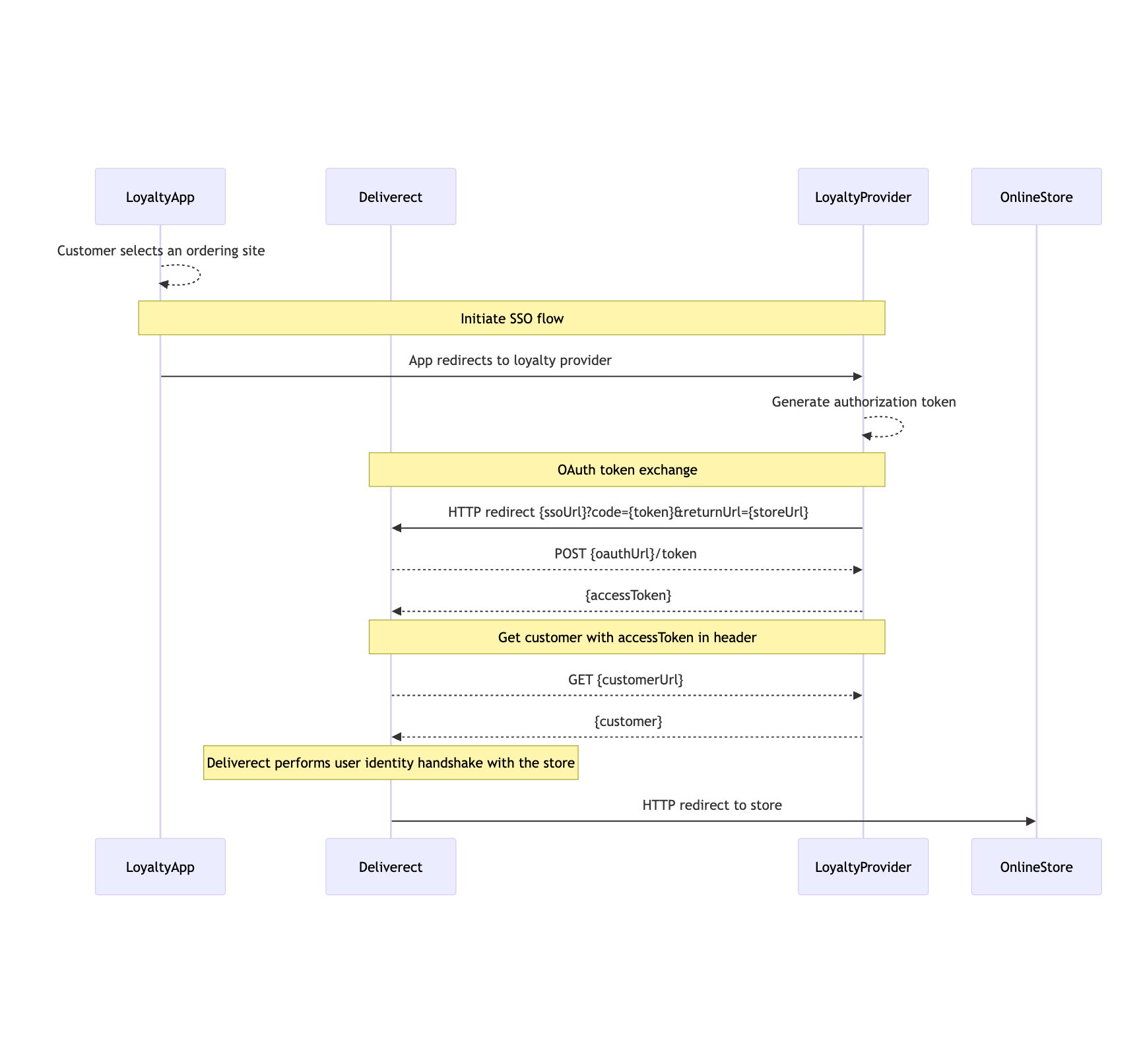
A customer has the possibility to start the experience from a dedicated app and then use an external ordering channel to place an order. To simplify the process and remove friction we offer a Single Sign On (SSO) feature, that allows the customer to login in his loyalty app remaining connected when he moves to the ordering platform.
Requirements
The following requirements needs to be fulfilled to enable the SSO workflow:
- Loyalty partner should return the SSO settings in the registration response
- Loyalty partner should support OAuth token exchange
- Loyalty partner should support GET customer by access token
- Channel needs to support SSO authorization
Redirect to ordering platform
The redirect from the loyalty partner app to the ordering channel happens through Deliverect using the SSO redirect URL
Workflow
Step 1: User selects store in the loyalty app
The customer navigates through the application of a loyalty provider and browses the available store.
The customer selects one of the stores and starts SSO workflow.
Step 2: Loyalty provider creates authorisation token
The customer is redirected to the loyalty provider's API, which will generate an authorisation token.
Step 3: Loyalty provider initiates SSO authentication
The loyalty provider's API will then trigger an HTTP redirect the browser to the loyalty Deliverect's SSO authentication endpoint. The redirect must be in the following format
https://<server>/loyalty/{channelLinkId}/sso?code={authToken}&returnUrl={deliverectStoreUrl}
server: Deliverect server. This detail will be provided to you by one of our agents.channelLinkId: This detail will be provided to you by one of our agents.code: the authorization code generated in step 2returnUrl: The online ordering url where to redirect the customer. This detail will be provided to you by one of our agents.
Step 4: Deliverect loyalty exchanges the authorisation code for access token
The Deliverect Loyalty server will verify the authenticity of this request by contacting the loyalty provider server by calling the partner’s <oauthUrl>/token defined during registration. In this call, Deliverect will attempt to exchange the authorisation token for an access token.
Step 5: Deliverect loyalty retrieves customer details
After receiving the access token, Deliverect will proceed to retrieve the customer’s information by calling the <getCustomerUrl> endpoint and sending the <accessToken> in the request headers as a Bearertoken
{"Authorization": "Bearer <accessToken>"}
Step 6: Customer authentication handshake
Deliverect performs a customer authentication handshake with the online ordering store. On successful authentication, the customer is finally redirected to the ordering store.
Step 7: Customer proceeds with the ordering experience
The customer completes the order without the need to authenticate again in the online ordering website.
Flow Diagrams