

How to configure 'Variant' products
Introduction
A variant lets customers choose between different versions of the same product, such as size, flavor, or quantity. Deliverect will send ordering platforms the lowest priced option as the variant product, allowing the menu display to show the additional cost of e.g. a larger size, so pricing stays clear and transparent for the customer.
Common variant groups include:
- Pizza sizes — large, medium, small
- Drink options — regular cola, diet cola
- Ice cream flavors — chocolate, vanilla
Example
Chicken Tenders starts at $8, with three variants:
| Variant | Additional cost | Total price |
|---|---|---|
| 3 pieces | +$0 | $8.00 |
| 6 pieces | +$3.00 | $11.00 |
| 9 pieces | +$5.50 | $13.50 |
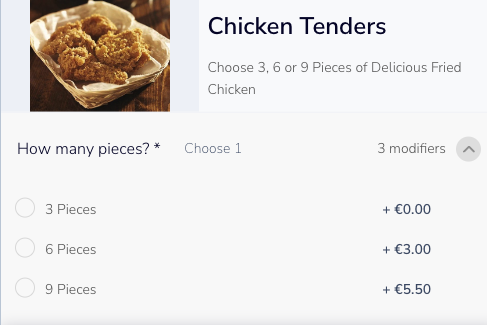
Configure a Variant
To create a variant product the following need to be in place;
- A variant product marked (
isVariant: true) with a variant group specified withinsubProducts. - A variant group (
isVariantGroup: true) listing each variant option withinsubProducts - Each variant option following a standard product setup with its own
plu,price, and tax fields.
"products": [
    {
      "productType": 1,
      "plu": "VAR-PROD-1",
      "price": 0,
      "name": "Chicken Tenders",
      "description": "Choose 3, 6 or 9 Pieces of Delicious Fried Chicken",
      "isVariant": true,
      "deliveryTax": 9000,
      "takeawayTax": 9000,
      "eatInTax": 9000,
      "subProducts": [
        "MG-VAR-1"
      ]
    },
    {
      "productType": 3,
      "plu": "MG-VAR-1",
      "name": "How many pieces?",
      "isVariantGroup": true,
      "subProducts": [
        "VAR-1",
        "VAR-2",
        "VAR-3"
      ],
      "min": 1,
      "max": 1
    },
    {
      "productType": 1,
      "plu": "VAR-1",
      "price": 800,
      "name": "3 Pieces",
      "deliveryTax": 9000,
      "takeawayTax": 9000,
      "eatInTax": 9000
    },
    {
      "productType": 1,
      "plu": "VAR-2",
      "price": 1100,
      "name": "6 Pieces",
      "deliveryTax": 9000,
      "takeawayTax": 9000,
      "eatInTax": 9000
    },
    {
      "productType": 1,
      "plu": "VAR-3",
      "price": 1350,
      "name": "9 Pieces",
      "deliveryTax": 9000,
      "takeawayTax": 9000,
      "eatInTax": 9000
    }
  ]
}
Receiving Orders with Variants
When a customer places an order, the POS receives the variant product, the selected variant option, and any modifiers, nested under subItems.
Key fields:
plu— the product identifier used by the POSproductType— the Deliverect product type valuesubItems— the selected variant or modifier items, nested under the parent product
{
  "items": [
    {
      "plu": "VAR-PROD-1",
      "name": "Chicken tenders",
      "price": 0,
      "quantity": 1,
      "productType": 1,
      "subItems": [
        {
          "plu": "VAR-1",
          "name": "3 Pieces",
          "price": 800,
          "quantity": 1,
          "productType": 1,
          "subItems": [
            {
              "plu": "SAUCE-02",
              "name": "Hot Sauce",
              "price": 50,
              "quantity": 1,
              "productType": 2,
              "subItems": []
            }
          ]
        }
      ]
    }
  ]
}
Updated 2 months ago
See related guides
Did this page help you?