

How to handle Taxes
Introduction
Depending on whether a Location operates within a tax-exclusive or tax-inclusive region, the POS has certain fiscal responsibilities to properly handle taxation.
Tax Exclusive
Products - Tax Exclusive
In tax-exclusive regions, the POS needs to sync product prices without tax included, and specify the tax rate per item and fulfillment type, as in the example below where deliveryTax , takeawayTax and eatInTax are defined;
{
  "name": "Chicken Sate",
  "productType": 1,
  "plu": "P-SATE",
  "price": 450,
  "deliveryTax": 10000,
  "takeawayTax": 10000,
  "eatInTax": 10000
}
Order Payload - Tax Exclusive
For the order payload received, a separate tax calculation is applied by the ordering platform and is included as a single taxTotal The POS is responsible for fiscal reporting of this taxation.
"items": [
  {
    "name": "Chicken Sate",
    "plu": "P-SATE",
    "price": 450,
    "productType": 1,
    "quantity": 1,
    "subItems": []
  }
],
"payment": {
  "amount": 495,
  "due": 0,
  "type": 0
},
"taxes": [
    {
      "name": "GST",
      "taxClassId": 0,
      "total": 45
    }
  ],
"taxTotal": 45,
"taxRemitted": 45| Attribute | Meaning | Type |
|---|---|---|
taxTotal | This is combined total of all taxes applied to the order | integer |
taxRemitted | In regions where the channel has responsibility for charging tax e.g. where they are 'Marketplace Facilitator' this is the total tax remitted | integer |
taxes.name | An optional value for channels to provide to specific the name for each tax applied | string |
taxes.taxClassId | An optional value for channels to provide to an Id to identify the tax applied | integer |
taxes.total | An optional value for channels to provide to the total specific to the tax applied | integer |
Tax Inclusive
Products
In tax-inclusive regions, the POS needs to sync product prices inclusive of tax, while still specifying the tax rate applied per item and fulfillment type, as shown in the Tax Exclusive example above.
Order Payload
For the order payload received, no separate tax calculation is applied, the item price already includes this calculation. The POS continues to be responsible for fiscal reporting of this taxation.
Configuring Default Tax Setting
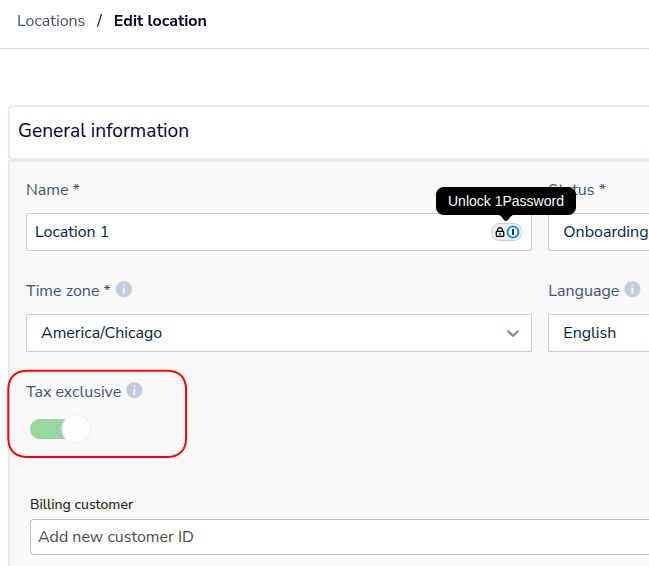
An account will be automatically set per region to either tax exclusive or inclusive, depending on the region set. You can verify this setting via editing the location settings and checking the toggle highlighted below.
Updated 2 months ago