

How to handle Store Opening Hours
Store Opening Hours
Only allow ordering within the store opening hours. Each object in the array specifies one period of store availability per day. A day can have multiple non-overlapping availability periods.
| Field | Use | Type |
|---|---|---|
dayOfWeek | An integer value that indicates the day of the week for this availability (starting at 1 for Monday). | integer |
startTime | A 24-hour HH:MM format notation of the start time of availability expressed in the local time of the location. | string |
endTime | A 24-hour HH:MM format notation of the end time of availability expressed in the local time of the location. | string |
{  "openingHours": {
      "timezone": "Europe/Brussels",
      "dayTimeRanges": [
          {
              "dayOfWeek": 1,
              "endTime": "17:00",
              "startTime": "09:00"
          },
          {
              "dayOfWeek": 2,
              "endTime": "17:00",
              "startTime": "09:00"
          },
          {
              "dayOfWeek": 3,
              "endTime": "17:00",
              "startTime": "09:00"
          },
          {
              "dayOfWeek": 3,
              "endTime": "22:00",
              "startTime": "19:00"
          }
      ]
   }
}
Store Status
The status attribute indicates whether a store is currently open or closed according to its configured operating hours. Additional statuses account for temporary changes in order acceptance, such as Busy Mode. When a store is handling high demand, it can mark itself as busy with a delayed preparation time, or as paused when it is not accepting orders.
| Status | Use | Format |
|---|---|---|
open | The store is open and accepting orders. | string |
closed | The store is closed at this time and not accepting orders. | string |
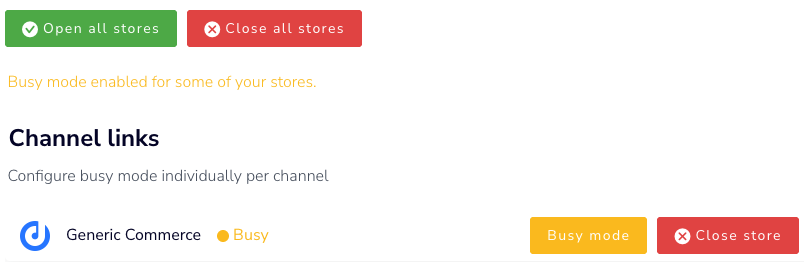
busy | The store is accepting orders with a preparation delay in minutes, marked as preparationTimeDelay. Do not allow ASAP orders, and make the delay clear to the customer. | string |
paused | The store is not currently accepting orders. | string |
"status": "busy",
"preparationTimeDelay": 30,
Testing busy mode and opening hours
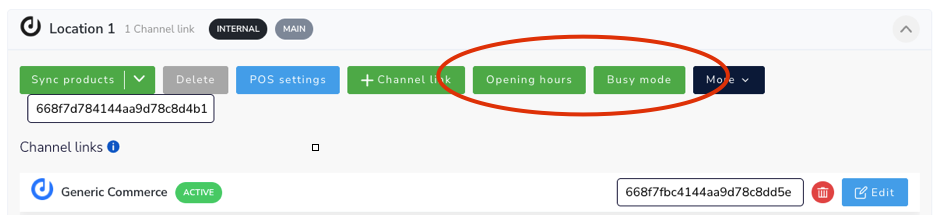
Go to Locations > Select Opening hours / busy mode.
Updated about 1 month ago
Did this page help you?