

How to handle Modifer Groups
Modifiers and modifier groups
To explain what modifiers and modifier groups are, consider the following example.
Say that a restaurant sells a product "Build your own pizza" and the restaurant wants to offer the first topping i.e., "Pepperoni" and also the ability to add extra topping "Bacon" and "Mushroom" which has a price.
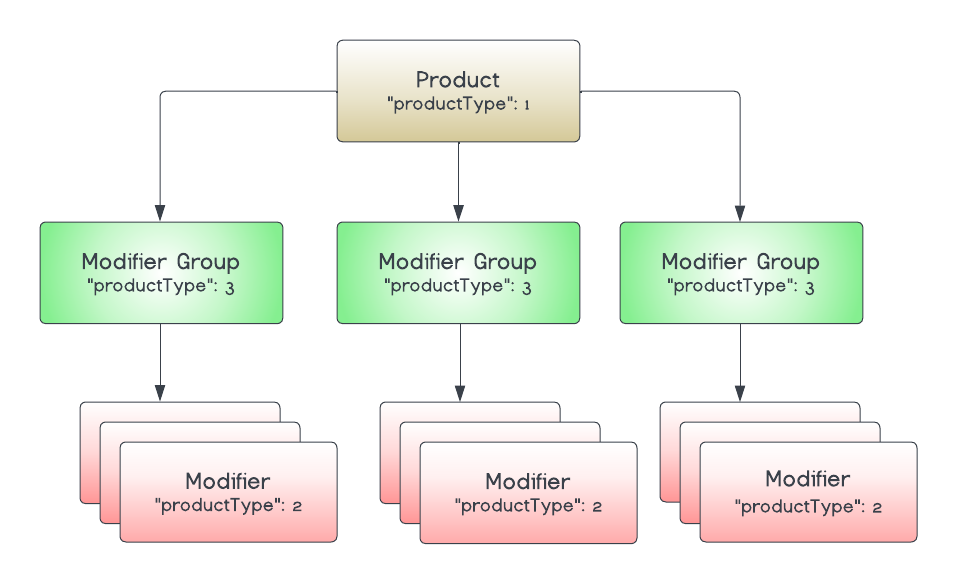
In Deliverect, this will be modeled using modifiers and modifier groups. Each topping is a modifier, which will end up looking like this in the JSON sent in a menu push request:
"modifiers": {
  "63578d7b678870d57eb70996": {
                    "name": "Pepperoni",
                    "productType": 2,
                    "plu": "PEPP-#O0#-",
                    "price": 0,
                        }
...
 "63578d7b678870d57eb7099d": {
                    "name": "Bacon",
                    "productType": 2,
                    "plu": "BAC-#O1#-",
                    "price": 100,
                        }
...
"63578d7b678870d57eb7099f": {
                    "name": "Mushroom",
                    "productType": 2,
                    "plu": "MUSH-#O1#-",
                    "price": 100,
To group the different choices (modifiers), we create a modifier group. The group should have a customer-facing name (e.g., "Choose your First Topping")
The IDs of the modifiers corresponding to each topping are in the subProductsarray,
"modifierGroups": {

"63578d7b678870d57eb7099b": {
                    "name": "Choose your First Two Toppings",
                    "productType": 3,
  ...
                    "plu": "FREE-TOP",
                    "subProducts": [
                        "63578d7b678870d57eb70996",
                        "63578d7b678870d57eb70997",
                        "63578d7b678870d57eb70998",
                        "63578d7b678870d57eb70999",
                        "63578d7b678870d57eb7099a"
                    ],
                    "max": 2,
                    "min": 2,
                    "multiMax":2
...
                },
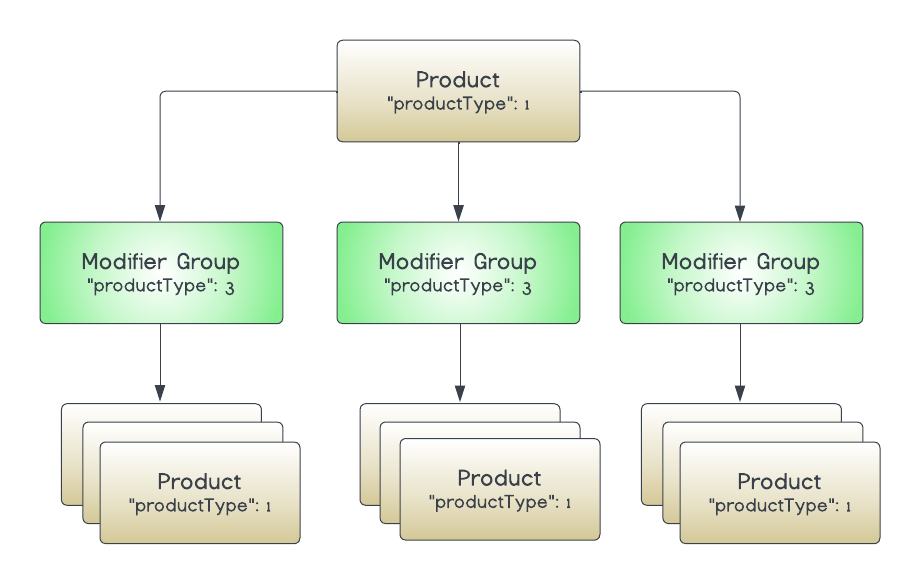
Modifier groups can also contain regular products "productType": 1 inside apart from modifiers "productType": 2.
Minimum, Maximum and Multi-Max
In the example above, you will see the "max", "min" and "multiMax" attributes, these represent certain ordering constraints set when ordering from this group of options.
Certain scenarios as follows can be expected, depending on different configurations of these attributes;
Minimum
This setting "min" can be interpreted in two main ways where there is an'
Optional Choice - Where a choice is optional, then you should expect"min": 0to be set.
Required Choice - Where a choice is required, then you should expect"min": 1to be set
Maximum
If customers want to limit the total number of extra toppings to five within any one product selection, you would expect "max": 5.
Multi-select modifiers
Items in a modifier group can be allowed to select more than once, whilst the "max" value controls the upper limit of how many modifiers are allowed, "multiMax" controls how many of a single modifier can be chosen.
For example, "multiMax":2 indicates a single modifier can be selectable no more than twice.
Nested Modifiers
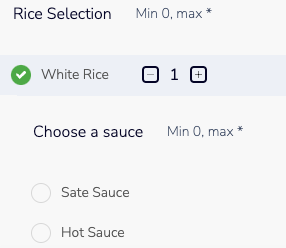
These are modifiers that are part of a modifier group which is nested within another modifier group. In the specific example, Chicken Sate, you can select your dish and add a modifier from Rice or Noodles selection. After you do that, you will be asked to choose additional modifiers, like the sate or hot sauce which are nested.
- Product Type: 1 Chicken Sate
- Product Type 3: Rice Selection
- Product Type 2: White Rice
- Product Type 3: Choose a Sauce
- Product Type 2: Sate Sauce
- Product Type 2: Hot Sauce
- Product Type 3: Choose a Sauce
- Product Type 2: White Rice
- Product Type 3: Rice Selection
subProducts, parentId, PLU
You can find the products that exist for each category and/or group (bundles, modifier groups) under subProducts. Do not reference the parentId parameter as this is deprecated.
Default Quantity (pre-selected)
An attribute "defaultQuantity" can be included to a sub-item to instructs whether it should be 'pre-selected'.
e.g. where "defaultQuantity": 1, or any quantity > 0 the channel should ensure the item is pre-selected. Typically this will only display '1', although higher default quantities can also be set if pre-selecting a specific quantity is supported.
Updated 2 months ago