

How to 'flatten' nested modifers
Overview
A product configuration can include a sub-group of options to be selected. If these options themselves contain their own sub-groups, this is reffered to as 'Nested Modifiers'
Although this is a means for end-users to customise their selection without immediately being presented with a large amount of sub-options, it is not universally supported by all ordering platforms.
There may be UX considerations from certain channels on this or technical limitations to offering more than a single layer of sub-items.
In such circumstances, Deliverect can help by handling a menu which contains nested modifiers differently per channel, without product configurations needing changed. The example below illustrates how we can 'Flatten Nested Modifiers' on a per channel basis.
Flattened Nested Modifiers
The toggle below can be enabled on a per channel basis, once enabled, it will identify all the modifier groups for each choice and seperate them into a sub-group or their own. them ow one level
Nested Modifiers Example
Below is a simplified example of a POS structure of a product containing nested modifiers
{
    "accountId": "62d7********5af1",
    "locationId": "6463********e3b9",
    "products": [
        {
            "productType": 1,
            "plu": "P-SATE",
            "price": 450,
            "name": "Chicken Sate",
            "deliveryTax": 6000,
            "subProducts": [
                "MG-SIDE"
            ]
        },
        {
            "productType": 3,
            "plu": "MG-SIDE",
            "price": 900,
            "name": "Choose a side",
            "deliveryTax": 6000,
            "subProducts": [
                "RICE",
                "NOOD"
            ],
            "min": 1,
            "max": 1
        },
        {
            "productType": 1,
            "plu": "RICE",
            "price": 0,
            "name": "Rice",
            "deliveryTax": 6000,
            "subProducts": [
                "MG-SAUCES"
            ]
        },
        {
            "productType": 1,
            "plu": "NOOD",
            "price": 0,
            "name": "Noodles",
            "deliveryTax": 6000,
            "subProducts": [
                "MG-SAUCES"
            ]
        },
        {
            "productType": 3,
            "plu": "MG-SAUCES",
            "name": "Choose a sauce",
            "multiMax": 2,
            "subProducts": [
                "SAUCE-01",
                "SAUCE-02"
            ]
        },
        {
            "productType": 2,
            "plu": "SAUCE-01",
            "price": 0,
            "name": "Sate Sauce",
            "deliveryTax": 9000
        },
        {
            "productType": 2,
            "plu": "SAUCE-02",
            "price": 0,
            "name": "Hot Sauce",
            "deliveryTax": 9000
        }
    ],
    "categories": []
}
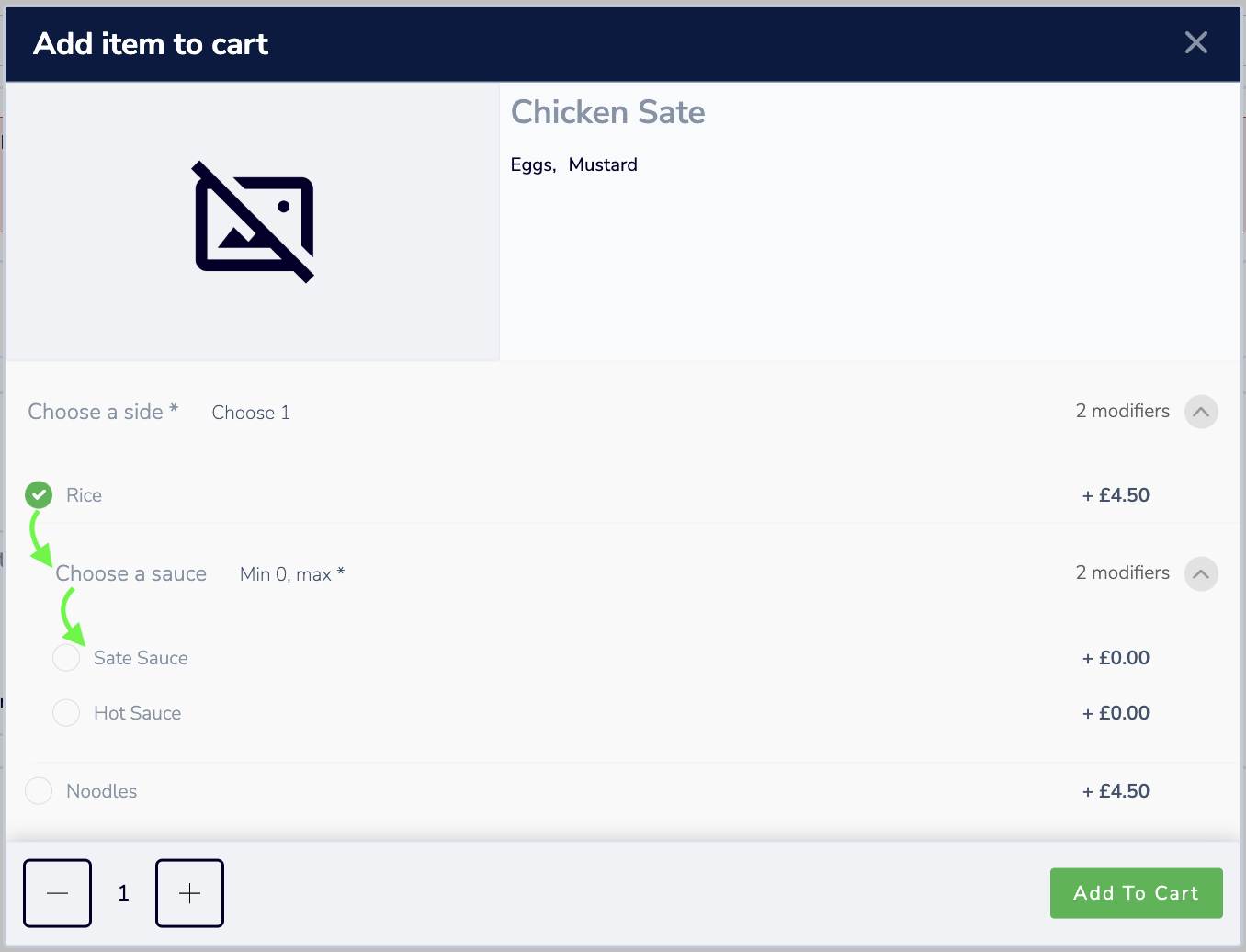
Nested Modifiers in Menu
This would produce an item with sub-options to 'Choose a sauce' nested underneath each side.
Flattened Nested Modifiers in Menu
With the setting to flatten modifiers on, it would split the sub-options to 'Choose a sauce' into their own sub-group
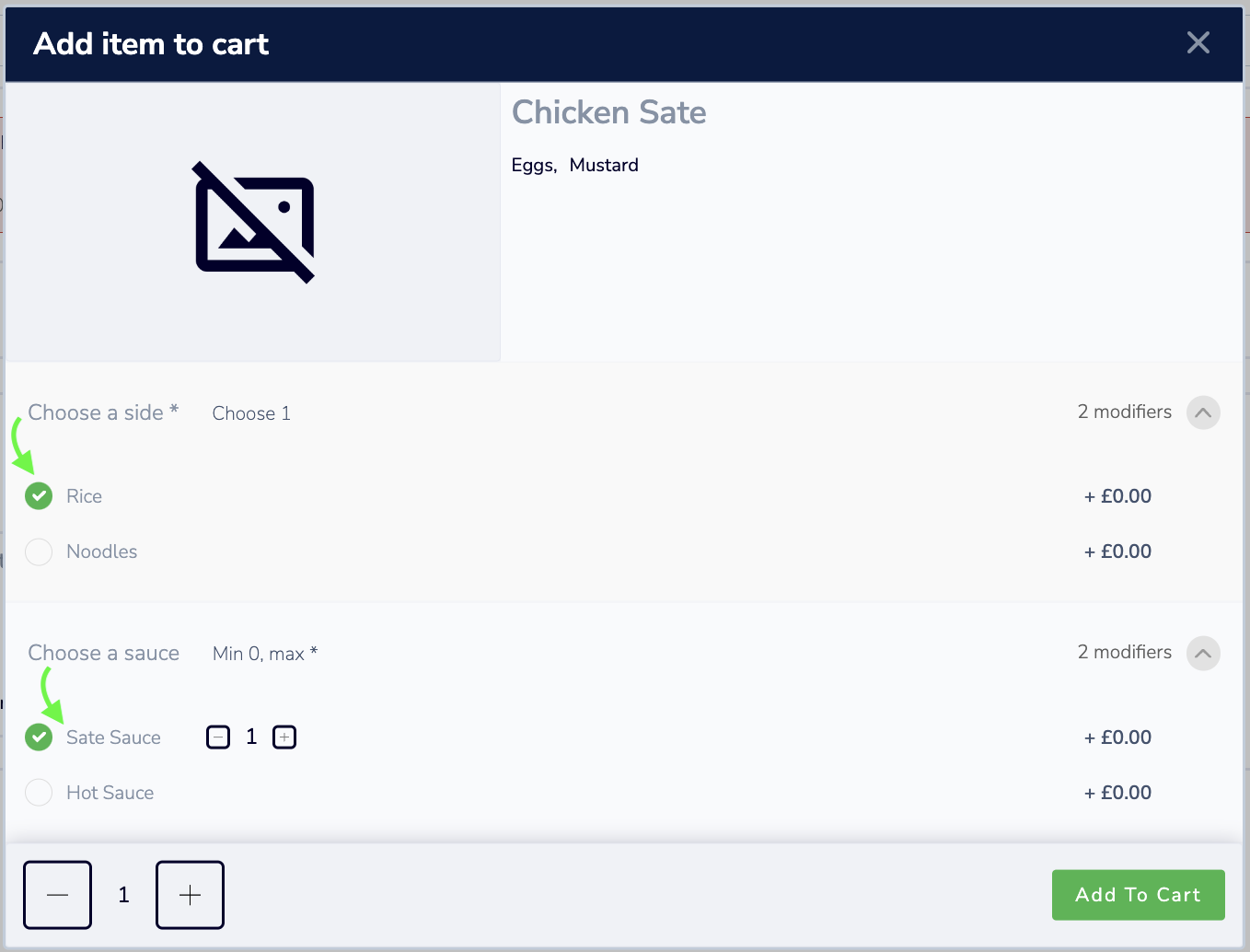
Requirement for identical modifier groupThe only way for the flattening format to work is if the nested sub-groups are identical, otherwise sub-options can be selected that are potentially not valid/possible options
Updated 2 months ago