

How to process Taxes
Introduction
If a store operates in tax exclusive regions such as the United States/Canada, all menu prices will exclude tax. This requires your channel to process orders accordingly with a tax calculation made within a separate "taxes" array.
Format
Within the published menu content, you will see the tax rate to apply to each item according to the order type as in sample below.
This calculation then needs factored into the payment total with below formula
"deliveryTax": 6000,
"takeawayTax":6000,
"eatInTax": 6000,
Payment Total Formula
amount = Σ(item prices) + deliveryCost + serviceCharge + deliveryCostTax + serviceChargeTax + Σ(taxes)
Taxes Array
The below tables defines the attributes in the taxes array;
| Key | Value | Format |
|---|---|---|
taxClassId | the ID corresponding to this tax class as used by Deliverect | Integer |
name | the display name for this category of taxes, which is how it should be printed on a receipt | String |
total | the sum of all tax amounts for this category | Integer |
Tax Related Fields
You must ensure the following are set correctly when processing tax exclusive orders;
| Field | Rule |
|---|---|
price (per item) | Must be sent without tax included |
amount (total payment) | Must include calculated taxes |
taxes (array) | Must detail the tax amount applied, as an integer with 2 decimal digits. Breaking this down per tax class (e.g. GST, HST) is optional |
deliveryCost | Must be sent without tax included |
serviceCharge | Must be sent without tax included |
deliveryCostTax | Sent separately — must not appear in the taxes array |
serviceChargeTax | Sent separately — must not appear in the taxes array |
discountTotal (if present) | Item taxes must be calculated after the discount amount has been deducted |
Example Order
{
    "items": [
        {
            "plu": "CHIC-02",
            "name": "Chicken",
            "price": 750,
            "quantity": 1,
            "subItems": []
        }
    ],
    "payment": {
        "amount": 1133,
        "type": 0
    },
    "deliveryCost": 200,
    "serviceCharge": 300,
    "discountTotal": -200,
    "taxes": [
        {
            "taxClassId": 0,
            "name": "taxes",
            "total": 33
        }
    ],
    "taxRemitted":33,
    "deliveryCostTax": 20,
    "serviceChargeTax": 30
}
Tax Remitted
taxRemitted In regions where the channel has responsibility for charging tax e.g. where they are 'Marketplace Facilitator' this is the total tax remitted. This value should be sent outside the taxes array.
Testing with Tax Exclusive Accounts
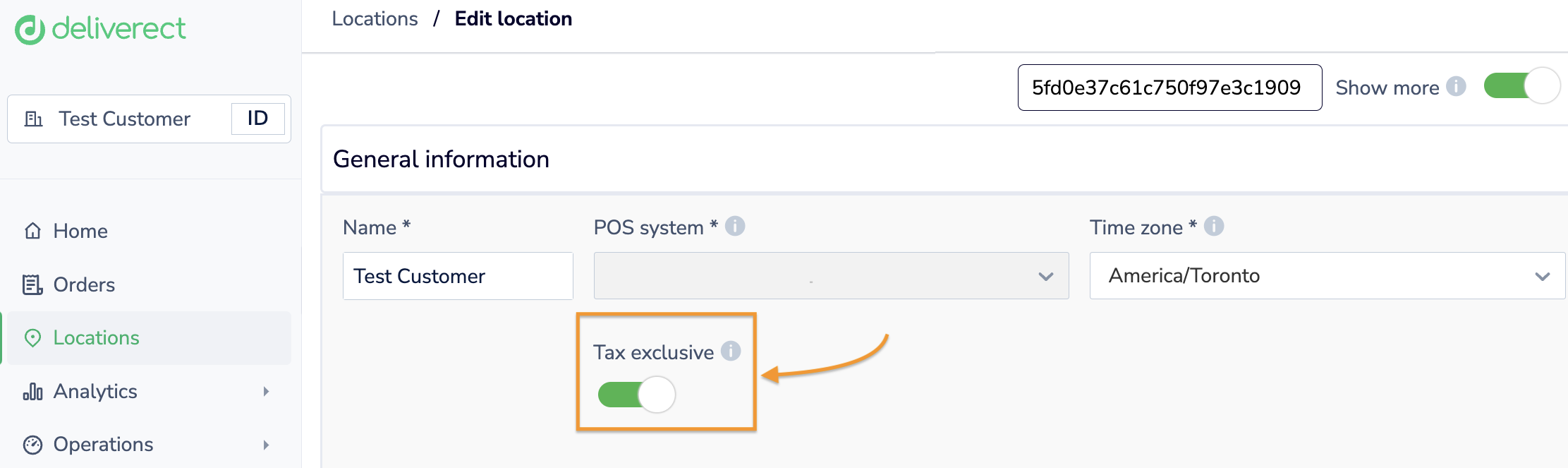
You can check this by going to the Locations page and clicking on the Edit button for the location. Next, activate the Show More toggle. The Tax Exclusive option will be displayed.
Updated about 2 months ago