

How to Retrieve Store Details
Retrieve the storeId required before basket creation.
Retrieve storeId(s)
Retrieve the storeId required before basket creation. A storeId is the unique identifier for a store-channel (ordering platform) at a specific location. It may also be referenced as channelLinkId throughout the documentation. Baskets are created in association with a specific storeId.
Use the Get stores endpoint to retrieve the storeId for an account.
Store opening hours
Only allow ordering within the store opening hours. Each object in the array specifies one period of store availability per day. A day can have multiple non-overlapping availability periods.
| Field | Use | Type |
|---|---|---|
dayOfWeek | An integer value that indicates the day of the week for this availability (starting at 1 for Monday). | integer |
startTime | A 24-hour HH:MM format notation of the start time of availability expressed in the local time of the location. | string |
endTime | A 24-hour HH:MM format notation of the end time of availability expressed in the local time of the location. | string |
{  "openingHours": {
      "timezone": "Europe/Brussels",
      "dayTimeRanges": [
          {
              "dayOfWeek": 1,
              "endTime": "17:00",
              "startTime": "09:00"
          },
          {
              "dayOfWeek": 2,
              "endTime": "17:00",
              "startTime": "09:00"
          },
          {
              "dayOfWeek": 3,
              "endTime": "17:00",
              "startTime": "09:00"
          },
          {
              "dayOfWeek": 3,
              "endTime": "22:00",
              "startTime": "19:00"
          }
      ]
   }
}
Store Status
The status attribute indicates whether a store is currently open or closed according to its configured operating hours. Additional statuses account for temporary changes in order acceptance, such as Busy Mode. When a store is handling high demand, it can mark itself as busy with a delayed preparation time, or as paused when it is not accepting orders.
| Status | Use | Format |
|---|---|---|
open | The store is open and accepting orders. | string |
closed | The store is closed at this time and not accepting orders. | string |
busy | The store is accepting orders with a preparation delay in minutes, marked as preparationTimeDelay. Do not allow ASAP orders, and make the delay clear to the customer. | string |
paused | The store is not currently accepting orders. | string |
"status": "busy",
"preparationTimeDelay": 30,
Testing busy mode and opening hours
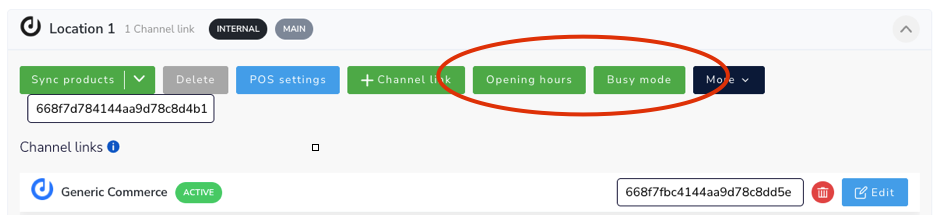
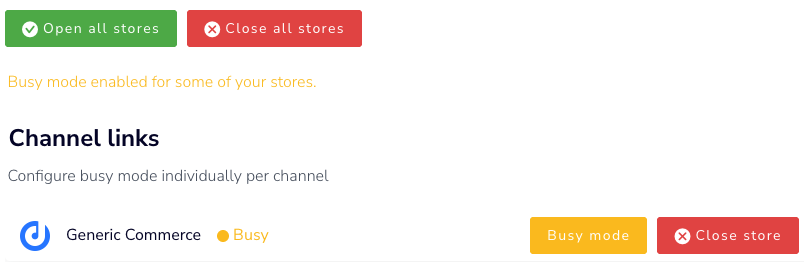
Go to Locations > Select Opening hours / busy mode.
Updated 27 days ago